
Creative Approval Process
This page describes the creative approval process for campaigns created within the Martailer retail media platform. It outlines the approval workflows for both managed service and self-service campaigns, including approval stages, roles, permissions, and how approvals are handled in the platform UI.
The approval process depends on the type of ad campaign being created:
Sponsored Product Ads (SPA) These ads are native product placements and typically do not require an approval step. Display Ads These campaigns require uploaded image or video creatives to be reviewed and approved by a designated approver before they can go live.
Creative Approval Process: Detailed Flow
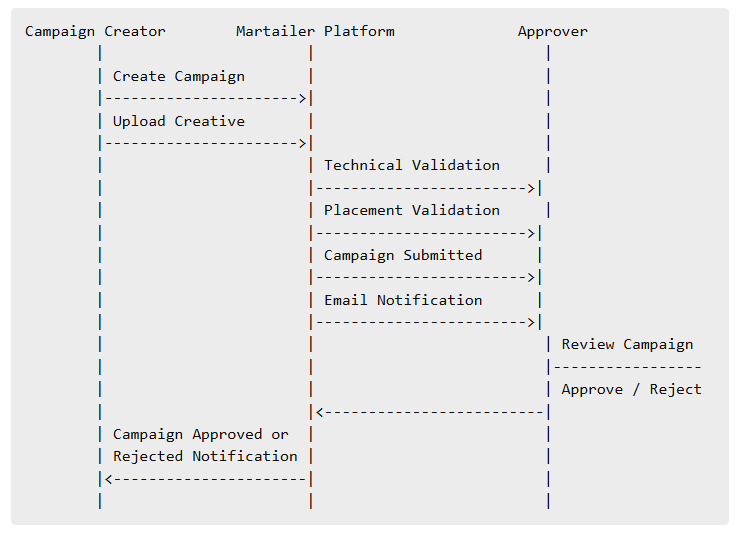
1. Creative Upload and Technical Validation **For campaigns that require image or video uploads, the platform automatically performs technical validation checks during the file upload process. These checks ensure that the creative meets the required specifications for delivery.
Validated parameters can include:
- file type (e.g., .jpg, .png, .mp4)
- file size
- aspect ratio
- resolution
- bitrate (video only)
- duration (video only), etc.
If a creative fails any of these validations, the upload is rejected and the user is prompted to update the file before proceeding.
2. Advertising Placement Validation **After a successful upload, the platform verifies whether the creative is compatible with the selected advertising placement. This includes validation against placement-specific requirements for Web and App placements.
Only creatives that match technical requirements and advertising placement specifications can proceed to the approval stage.
3. Campaign Submission and Approval Stage Once the campaign setup is completed and the creative has passed validation, the campaign is moved into the Approval stage.
Email Notification A retail account administrator or dedicated approver receives an automated email notification containing campaign details and a direct link to the campaign approval page within the Martailer platform.
Martailer UI: Campaign Approval Page When an approver accesses the platform, they are directed to the Campaign Approval Page, which displays all campaigns awaiting review.
Approver can preview creatives directly within the UI to ensure compliance with brand and advertising guidelines.
After reviewing the campaign and its creatives, the approver can take one of the following actions:
- Approve: Confirms that the campaign and creatives comply with all applicable guidelines. The campaign status is updated to Approved and becomes eligible for launch according to its scheduled start date.
- Reject: Indicates that the campaign or creative does not meet the required standards. The approver can provide a reason for rejection. It is communicated back to the campaign creator via email. Once rejected, the campaign can be edited, and updated creatives can be resubmitted for approval.
Approval Process: Sequence Diagram
Account Types and User Roles Martailer supports different account types and user roles to control access, permissions, and responsibilities throughout the platform, including the creative approval process.
Account Types There are two primary account types on the platform:
- Retailer Account: used by retail partners who manage inventory, placements, and approvals for campaigns running on their properties.
- Advertiser Account: used by brands or agencies to create and manage advertising campaigns.
User Roles Each account type supports three user roles that define the level of access within the platform:
- Administrator
- Standard
- Read-only
Only Retailer Account users with the Admin role are eligible to act as creative and/or campaign approvers.
Summary
- SPA campaigns generally bypass the creative approval flow.
- Display campaigns require both technical validation and manual approval.
- Approval decisions are managed through a dedicated approval interface and supported by automated email notifications.
- An approver is a Retailer Account user with the highest administrative (Admin) role on the platform.
- Only campaigns containing approved creatives are eligible to go live.
- Campaigns that are rejected must be updated and resubmitted for approval before they can be activated.
Updated 6 days ago